This is the multi-page printable view of this section. Click here to print.
Resource Management
1 - Resource Pools
Concept
Benefits
- Shifting left now comes to Resource-Management. From the perspective of Cluster-Administrators you just define the Quantity and the Audience for Resources. The rest is up to users managing these namespaces (audience).
- Better automation options and integrations. One important aspect for us is, how we still can be beneficial with concepts like
VClusters (VCluster/K3K)orCPs as pods (Kamaji). We think with this solution we have found a way to make capsule still beneficial and even open new use-cases for larger Kubernetes platforms. - Enables more use-cases and provides more flexibility than standard
ResourceQuotasor our previous ResourceQuota-Implementation. Autobalancing is no longer given by default, however can be implemented according to your platform’s needs see future ideas.
ResourcePool
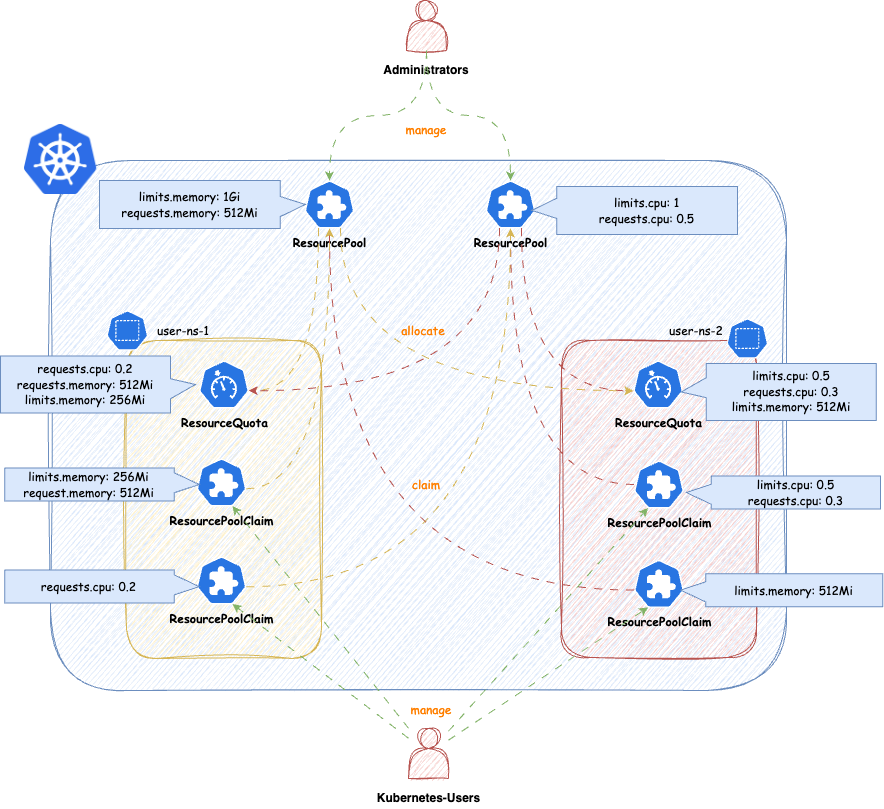
ResourcePools allow you to define a set of resources, similar to how ResourceQuotas work. ResourcePools are defined at the cluster scope and should be managed by cluster administrators. However, they provide an interface where cluster administrators can specify from which namespaces resources in a ResourcePool can be claimed. Claiming is done via a namespaced CRD called ResourcePoolClaim.
It is then up to the group of users within those namespaces to manage the resources they consume per namespace. Each ResourcePool provisions a ResourceQuota into all the selected namespaces. Essentially, when ResourcePoolClaims are assigned to a ResourcePool, they stack additional resources on top of that ResourceQuota, based on the namespace from which the ResourcePoolClaim was created.
You can create any number of ResourcePools for any kind of namespace — they do not need to be part of a Tenant. Note that the usual ResourceQuota mechanisms apply when, for example, the same resources are defined in multiple ResourcePools for the same namespaces (e.g., the lowest defined quota for a resource is always considered).
apiVersion: capsule.clastix.io/v1beta2
kind: ResourcePool
metadata:
  name: example
spec:
  quota:
    hard:
      limits.cpu: "2"
      limits.memory: 2Gi
      requests.cpu: "2"
      requests.memory: 2Gi
      requests.storage: "5Gi"
  selectors:
  - matchLabels:
      capsule.clastix.io/tenant: example
Selection
The selection of namespaces is done via labels, you can define multiple independent LabelSelectors for a ResourcePool. This gives you a lot of flexibility if you want to span over different kind of namespaces (eg. all namespaces of multiple Tenants, System Namespaces, stages of Tenants etc.)
Here’s an example of a simple Selector:
---
apiVersion: capsule.clastix.io/v1beta2
kind: ResourcePool
metadata:
  name: solar
spec:
  quota:
    hard:
      limits.cpu: "2"
      limits.memory: 2Gi
  selectors:
  - matchLabels:
      capsule.clastix.io/tenant: solar
This will select all the namespaces, which are part of the Tenant solar. Each statement under selectors is treated independent, so for example this is how you can select multiple Tenant’s namespaces:
apiVersion: capsule.clastix.io/v1beta2
kind: ResourcePool
metadata:
  name: green
spec:
  quota:
    hard:
      limits.cpu: "2"
      limits.memory: 2Gi
  selectors:
  - matchLabels:
      capsule.clastix.io/tenant: solar
  - matchLabels:
      capsule.clastix.io/tenant: wind
Quota
Nothing special here, just all the fields you know from ResourceQuotas. The amount defined in quota.hard represents the total resources which can be claimed from the selected namespaces. Through claims the ResourceQuota is then increased or decreased. Note the following:
- You can’t decrease the
.spec.quota.hardif the current allocation from claims is greater than the new decreased number. You must first release claims, to free up that space. - You can decrease or remove resources, if they are unused (
0)
Other than that, you can use all the fields from ResourceQuotas
---
apiVersion: capsule.clastix.io/v1beta2
kind: ResourcePool
metadata:
  name: best-effort-pool
spec:
  selectors:
  - matchExpressions:
    - { key: capsule.clastix.io/tenant, operator: Exists }
  quota:
    hard:
      cpu: "1000"
      memory: "200Gi"
      pods: "10"
    scopeSelector:
      matchExpressions:
      - operator: In
        scopeName: PriorityClass
        values:
        - "best-effort"
Each ResourcePool is representative for one ResourceQuota. In contrast to the old implementation, where multiple ResourceQuotas could have been defined in a slice. So if you eg. want to use different scopeSelectors or similar, you should create a new ResourcePool for each.
---
apiVersion: capsule.clastix.io/v1beta2
kind: ResourcePool
metadata:
  name: gold-storage
spec:
  selectors:
  - matchExpressions:
    - { key: company.com/env, operator: In, values: [prod, pre-prod] }
  quota:
    hard:
      requests.storage: "10Gi"
      persistentvolumeclaims: "10"
    scopeSelector:
      matchExpressions:
      - operator: In
        scopeName: VolumeAttributesClass
        values: ["gold"]
Defaults
Defaults can contain resources, which are not mentioned in the Quota of a ResourcePool. This is mainly to allow you, to block resources for example:
---
apiVersion: capsule.clastix.io/v1beta2
kind: ResourcePool
metadata:
  name: example
spec:
  defaults:
    requests.storage: "0Gi"
  quota:
    hard:
      limits.cpu: "2"
      limits.memory: 2Gi
      requests.cpu: "2"
      requests.memory: 2Gi
      requests.storage: "5Gi"
  selectors:
  - matchLabels:
      capsule.clastix.io/tenant: example
This results in a ResourceQuota from this pool in all selected, which blocks the allocation of requests.storage:
NAME                     AGE   REQUEST                 LIMIT
capsule-pool-example     3s    requests.storage: 0/0
If no Defaults are defined, the ResourceQuota for the ResourcePool is still provisioned but it’s .spec.hard is empty.
---
apiVersion: capsule.clastix.io/v1beta2
kind: ResourcePool
metadata:
  name: example
spec:
  quota:
    hard:
      limits.cpu: "2"
      limits.memory: 2Gi
      requests.cpu: "2"
      requests.memory: 2Gi
      requests.storage: "5Gi"
  selectors:
  - matchLabels:
      capsule.clastix.io/tenant: example
This allows users to essentially schedule anything in the namespace:
NAME                     AGE     REQUEST           LIMIT
capsule-pool-exmaple     2m47s
To prevent this, you might consider using the DefaultsZero option. This option can also be combined with setting other defaults, not part of the .spec.quota.hard. Here we are additionally restricting the creation of persistentvolumeclaims:
apiVersion: capsule.clastix.io/v1beta2
kind: ResourcePool
metadata:
  name: example
spec:
  defaults:
    "count/persistentvolumeclaims": 3
  config:
    defaultsZero: true
  quota:
    hard:
      limits.cpu: "2"
      limits.memory: 2Gi
      requests.cpu: "2"
      requests.memory: 2Gi
      requests.storage: "5Gi"
  selectors:
  - matchLabels:
      capsule.clastix.io/tenant: example
Results in:
NAME                     AGE   REQUEST                                                                                             LIMIT
capsule-pool-example     10h   count/persistentvolumeclaims: 0/3, requests.cpu: 0/0, requests.memory: 0/0, requests.storage: 0/0   limits.cpu: 0/0, limits.memory: 0/0
Options
Options that can be defined on a per-ResourcePool basis and influence the general behavior of the ResourcePool.
OrderedQueue
When ResourecePoolClaims are allocated to a pool, they are placed in a queue. The pool attempts to allocate claims in the order of their creation timestamps. However, even if a claim was created earlier, if it requests more resources than are currently available, it will remain in the queue. Meanwhile, a lower-priority claim that fits within the available resources may still be allocated—despite its lower priority.
Enabling this option enforces strict ordering: claims cannot be skipped, even if they block other claims from being fulfilled due to resource exhaustion. The CreationTimestamp is strictly respected, meaning that once a claim is queued, no subsequent claim can bypass it—even if it requires fewer resources.
Default: false
DefaultsZero
Sets the default values for the ResourceQuota created for the ResourcePool. When enabled, all resources in the quota are initialized to zero. This is useful in scenarios where users should not be able to consume any resources without explicitly creating claims. In such cases, it makes sense to initialize all available resources in the ResourcePool to 0.
Default: false
DeleteBoundResources
By default, when a ResourcePool is deleted, any ResourcePoolClaims bound to it are only disassociated—not deleted. Enabling this option ensures that all ResourcePoolClaims in a bound state are deleted when the corresponding ResourcePool is deleted.
Default: false
LimitRanges
When defining ResourcePools you might want to consider distributing LimitRanges via Tenant Replications:
apiVersion: capsule.clastix.io/v1beta2
kind: TenantResource
metadata:
  name: example
  namespace: solar-system
spec:
  resyncPeriod: 60s
  resources:
    - namespaceSelector:
        matchLabels:
          capsule.clastix.io/tenant: example
      rawItems:
        - apiVersion: v1
          kind: LimitRange
          metadata:
            name: cpu-resource-constraint
          spec:
            limits:
            - default: # this section defines default limits
                cpu: 500m
              defaultRequest: # this section defines default requests
                cpu: 500m
              max: # max and min define the limit range
                cpu: "1"
              min:
                cpu: 100m
              type: Container
ResourcePoolClaims
ResourcePoolClaims declared claims of resources from a single ResourcePool. When a ResourcePoolClaim is successfully bound to a ResourcePool, it’s requested resources are stacked to the ResourceQuota from the ResourcePool in the corresponding namespaces, where the ResourcePoolClaim was declared. So the declaration of a ResourcePoolClaim is very simple:
apiVersion: capsule.clastix.io/v1beta2
kind: ResourcePoolClaim
metadata:
  name: get-me-cpu
  namespace: solar-test
spec:
  pool: "sample"
  claim:
    requests.cpu: "2"
    requests.memory: 2Gi
ResourcePoolClaims are decoupled from the lifecycle of ResourcePools. If a ResourcePool is deleted where a ResourcePoolClaim was bound to, the ResourcePoolClaim becomes unassigned, but is not deleted.
Allocation
The Connection between ResourcePools and ResourcePoolClaims is done via the .spec.pool field. With that field you must be very specific, from which ResourcePool a ResourcePoolClaim claims resources. On the counter-part, the ResourcePool, the namespace from the ResourcePoolClaim must be allowed to claim resources from the ResourcePool.
If you are trying to allocate a Pool which does not exist or is not allowed to be claimed from, from the namespace the ResourcePoolClaim was made, you will get a failed Assigned status:
solar-test get-me-cpu Assigned Failed ResourcePool.capsule.clastix.io "sample" not found 12s
Similar errors may occur if you are trying to claim resources from a pool, where the given resources are not claimable.
Auto-Assignment
If no .spec.pool was delivered a Webhook will try to evaluate a matching ResourcePool for the ResourcePoolClaim. In that process of evaluation the following criteria are considered:
- A
ResourcePoolhas all the resources in their definition available theResourcePoolClaimis trying to claim.
If no Pool can be auto-assigned, the ResourcePoolClaim will enter an Unassigned state. Where it remains until ResourcePools considering the namespaces the ResourcePoolClaim is deployed in have more resources or a new ResourcePool is defined manually.
The Auto-Assignment Process is only executed, when .spec.pool is unset on Create or Update operations.
Bound
A ResourcePoolClaim is considered Bound, when the requested resources from the claim were successfully allocated from the ResourcePool. And the resources are actually used by any ResourceQuota in the namespace the claim was created in. If the resources are not used yet, the ResourcePoolClaims is considered Unused and can be deleted, change to a different ResourcePool or released without any further actions. However when it’s resources are used, the claim is Bound and can not be modified or deleted until the resources are released (not longer in use).
The selection of which ResourcePoolClaim is Bound is based on a greedy pattern. Meaning we sort the ResourcePoolClaims by their CreationTimestamp and try to allocate them one by one until no more resources are available from the ResourcePool.
Let’s see this in action. We can see that both claims are unused and can be released.
kubectl get resourcepoolclaim -n solar-test

NAME             POOL         READY   MESSAGE      BOUND   REASON            AGE
get-me-solar     solar-pool   True    reconciled   False   claim is unused   9h
get-me-solar-2   solar-pool   True    reconciled   False   claim is unused   9h


kubectl get resourcequota  -n solar-test

NAME                         REQUEST                                       LIMIT   AGE
capsule-pool-solar-pool      requests.cpu: 4/4, requests.memory: 4Gi/4Gi           7m53s
We now create a pod to consume the amount of resources provided by the claim get-me-solar (cpu: 2 and memory: 2Gi). We can see that half of the claim is now used:
kubectl get resourcepoolclaim -n solar-test

NAME             POOL         READY   MESSAGE      BOUND   REASON            AGE
get-me-solar     solar-pool   True    reconciled   True    claim is used     12m
get-me-solar-2   solar-pool   True    reconciled   False   claim is unused   12m

kubectl get resourcequota  -n solar-test

NAME                         REQUEST                                       LIMIT   AGE
capsule-pool-solar-pool      requests.cpu: 2/4, requests.memory: 2Gi/4Gi           11m
We can remove get-me-solar-2, as it’s still unused:
kubectl delete resourcepoolclaim -n solar-test get-me-solar-2

resourcepoolclaim.capsule.clastix.io "get-me-solar-2" deleted
However interactions with get-me-solar are now limited, as it’s Bound:
kubectl delete resourcepoolclaim -n solar-test get-me-solar

Error from server (Forbidden): admission webhook "resourcepoolclaims.projectcapsule.dev" denied the request: cannot delete the pool while claim is used in resourcepool solar-pool
If we remove the pod again, the ResourcePoolClaim becomes unused again and can be deleted or modified.
kubectl get resourcepoolclaim -n solar-test

NAME           POOL         READY   MESSAGE      BOUND   REASON            AGE
get-me-solar   solar-pool   True    reconciled   False   claim is unused   16m


kubectl get resourcequota  -n solar-test

NAME                         REQUEST                                     LIMIT   AGE
capsule-pool-solar-pool      requests.cpu: 0/2, requests.memory: 0/2Gi           17m
Release
If a ResourcePoolClaim is deleted, the resources are released back to the ResourcePool. This means that the resources are no longer reserved for the claim and can be used by other claims.
- By deleting the
ResourcePoolClaimobject (Recommended). - By annotating the
ResourcePoolClaimwithprojectcapsule.dev/release: "true". This will release theResourcePoolClaimfrom theResourcePoolwithout deleting the object itself and instantly requeue.
Both these actions can only be performed if the ResourcePoolClaim is in a Bound state False (not used currently). Otherwise your first have to free the resources used by the claim in order to release it. You can verify the Bound state for all ResourcePoolClaims in a namespace with.
Immutable
Once a ResourcePoolClaim has successfully claimed resources from a ResourcePool, the claim is immutable. This means that the claim cannot be modified or deleted until the resources have been released back to the ResourcePool. This means ResourcePoolClaim can not be expanded or shrunk, without releasing.
Queue
ResourcePoolClaims can always be created, even if the targeted ResourcePool does not have enough resources available at the time. In that case ResourcePoolClaims are put into a Queue-State, where they wait until they can claim the resources they are after. They following describes the different exhaustion indicators and what they mean, in case a ResourcePoolClaim gets scheduled.
When a ResourcePoolClaims is in Queued-State it is still mutable. So Resources and Pool-Assignment can still be changed.
Exhaustions
There are different types of exhaustions which may occur when attempting to allocate a claim. They Status of each claim indicates
PoolExhausted
The requested resources are not available on the ResourcePool. Until other resources release resources or the pool size is increased the ResourcePoolClaim is queued. In this example the ResourcePoolClaim is trying to claim requests.memory=2Gi. However only requests.memory=1Gi are still available to be claimed from the ResourcePool
NAMESPACE    NAME         POOL      STATUS   REASON          MESSAGE                                                          AGE
solar-test   get-mem      sampler   Bound    QueueExhausted   requested: requests.memory=2Gi, queued: requests.memory=1Gi   9m19s
In this case you have the following options:
- Request less resources for claiming -
requests.memory=1Gi - Wait until resources become from the
ResourcePool. When1Giofrequests.memorygets released, theResourcePoolClaimwill be able to bindrequests.memory=2Gi. - Release another
ResourcePoolClaimwhich might free uprequests.memory
However, claims which are requesting less than the ResourcePoolClaim solar-test, will be able to allocate their resources. Let’s say we have this second ResourcePoolClaim:
---
apiVersion: capsule.clastix.io/v1beta2
kind: ResourcePoolClaim
metadata:
  name: skip-the-line
  namespace: solar-test
spec:
  pool: "sampler"
  claim:
    requests.memory: 512Mi
Applying this ResourcePoolClaim leads to it being able to bind these resources. This behavior can be controlled with orderedQueue.
NAMESPACE    NAME            POOL      STATUS   REASON          MESSAGE                                                            AGE
solar-test   get-me-cpu      sampler   Bound    PoolExhausted   requested: requests.memory=2Gi, available: requests.memory=512Mi   16m
solar-test   skip-the-line   sampler   Bound    Succeeded       Claimed resources                                                  2s
If orderedQueue is enabled, only the first item that exhausted a resource from the ResourcePool get the PoolExhausted state. Following claims fro the same resources get QueueExhausted.
QueueExhausted
A ResourcePoolClaim with higher priority is trying to allocate these resources, but is exhausting the ResourcePool. The ResourcePool has orderedQueue enabled, meaning that the ResourcePoolClaim with the highest priority must first schedule it’s resources, before any other ResourcePoolClaim can claim further resources. This queue is resource based (eg. requests.memory), ResourcePoolClaim with lower priority may still be Bound, if they are not trying to allocate resources which are being exhausted by another ResourcePoolClaim with highest priority.
NAMESPACE    NAME         POOL      STATUS   REASON          MESSAGE                                                          AGE
solar-test   get-mem      sampler   Bound    QueueExhausted   requested: requests.memory=2Gi, queued: requests.memory=1Gi   9m19s
The above means, that as ResourcePoolClaim with higher priority is trying to allocate requests.memory=1Gi but that already leads to an PoolExhausted for that ResourcePoolClaim.
Priority
The Priority of how the claims are processed, is deterministic defined based on the following order of attributes from each claim:
CreationTimestamp- Oldest firstName- TiebreakerNamespace- Tiebreaker
Tiebreaker: If two claims have the same CreationTimestamp, they are then sorted alphabetically by their Name. If two claims have the same CreationTimestamp and Name, they are then sorted alphabetically by their Namespace. This means that if two claims are created at the same time, and have the same name, the claim with the lexicographically smaller Name will be processed first. If two claims have the same CreationTimestamp, Name, and Namespace, then the namespace is tiebreaking. This may be relevant in GitOps setups.
Operating
Monitoring
Migration
ResourcePools to be more granular or wider.To Migrate from the old ResourceQuota to ResourcePools, you can follow the steps below. This guide assumes you want to port the old ResourceQuota to the new ResourcePools in exactly the same capacity and scope.
The steps shown are an example to migrate a single Tenants ResourceQuota to a ResourcePool.
1. Overview
We are working with the following tenant. Asses the Situation of resourceQuotas. This guide is mainly relevant if the scope is Tenant:
apiVersion: capsule.clastix.io/v1beta2
kind: Tenant
metadata:
  labels:
    kubernetes.io/metadata.name: migration
  name: migration
spec:
  owners:
  - clusterRoles:
    - admin
    - capsule-namespace-deleter
    kind: User
    name: bob
  preventDeletion: false
  resourceQuotas:
    items:
    - hard:
        limits.cpu: "2"
        limits.memory: 2Gi
        requests.cpu: "2"
        requests.memory: 2Gi
    - hard:
        pods: "7"
    scope: Tenant
status:
  namespaces:
  - migration-dev
  - migration-prod
  - migration-test
  size: 3
  state: Active
2. Abstracting to ResourcePools
Warning
Do not apply the resourcepools yet, this may lead to workloads not being able to schedule!We are now abstracting . For each item, we are creating a ResourcePool with the same values. The ResourcePool will be scoped to the Tenant and will be used for all namespaces in the tenant. Let’s first migrate the first item:
---
apiVersion: capsule.clastix.io/v1beta2
kind: ResourcePool
metadata:
  name: migration-compute
spec:
  config:
    defaultsZero: true
  selectors:
  - matchLabels:
      capsule.clastix.io/tenant: migration
  quota:
    hard:
      limits.cpu: "2"
      limits.memory: 2Gi
      requests.cpu: "2"
      requests.memory: 2Gi
The naming etc. is up to you. Important, we again select all namespaces from the migration tenant with the selector capsule.clastix.io/tenant: migration. The defined config is what we deem to be most compatible with the old ResourceQuota behavior. You may change these according to your requirements.
The same process can be repeated for the second item (or each of your items). The ResourcePool will be scoped to the Tenant and will be used for all namespaces in the tenant. Let’s migrate the second item:
---
apiVersion: capsule.clastix.io/v1beta2
kind: ResourcePool
metadata:
  name: migration-size
spec:
  config:
    defaultsZero: true
  selectors:
  - matchLabels:
      capsule.clastix.io/tenant: migration
  quota:
    hard:
      pods: "7"
3. Create ResourcePoolClaims
Now we need to create the ResourcePoolClaims for the ResourcePools. The ResourcePoolClaims are used to claim resources from the ResourcePools to the respective namespaces. Let’s start with the namespace migration-dev:
kubectl get resourcequota -n migration-dev

NAME                  AGE     REQUEST                                                   LIMIT
capsule-migration-0   5m21s   requests.cpu: 375m/1500m, requests.memory: 384Mi/1536Mi   limits.cpu: 375m/1500m, limits.memory: 384Mi/1536Mi
capsule-migration-1   5m21s   pods: 3/3
Our goal is now to port the current usage into ResourcePoolClaims. Here you must make sure, that you might need to allocate more resources to your claims, than currently is needed (eg. to allow RollingUpdates etc.).. For the example we are porting the current usage over 1:1 to ResourcePoolClaims
We created the ResourcePool named migration-compute, where we are going to claim the resources from (for capsule-migration-0). This results in the following ResourcePoolClaim:
---
apiVersion: capsule.clastix.io/v1beta2
kind: ResourcePoolClaim
metadata:
  name: compute
  namespace: migration-dev
spec:
  pool: "migration-compute"
  claim:
    requests.cpu: 375m
    requests.memory: 384Mi
    limits.cpu: 375m
    limits.memory: 384Mi
The same can be done for the capsule-migration-1 ResourceQuota.
---
apiVersion: capsule.clastix.io/v1beta2
kind: ResourcePoolClaim
metadata:
  name: pods
  namespace: migration-dev
spec:
  pool: "migration-size"
  claim:
    pods: "3"
You can create the claims, they will remain in failed state until we apply the ResourcePools:
kubectl get resourcepoolclaims -n migration-dev

NAME      POOL   STATUS     REASON   MESSAGE                                                         AGE
compute          Assigned   Failed   ResourcePool.capsule.clastix.io "migration-compute" not found   2s
pods             Assigned   Failed   ResourcePool.capsule.clastix.io "migration-size" not found      2s
4. Applying and Verifying the ResourcePools
You may now apply the ResourcePools prepared in step 2:
kubectl apply -f pools.yaml
resourcepool.capsule.clastix.io/migration-compute created
resourcepool.capsule.clastix.io/migration-size created
After applying, you should instantly see, that the ResourcePoolClaims in the migration-dev namespace could be Bound to the corresponding ResourcePools:
kubectl get resourcepoolclaims -n migration-dev
NAME      POOL                STATUS   REASON      MESSAGE             AGE
compute   migration-compute   Bound    Succeeded   Claimed resources   4m9s
pods      migration-size      Bound    Succeeded   Claimed resources   4m9s
Now you can verify the new ResourceQuotas in the migration-dev namespace:
kubectl get resourcequota -n migration-dev
NAME                             AGE    REQUEST                                                   LIMIT
capsule-migration-0              23m    requests.cpu: 375m/1500m, requests.memory: 384Mi/1536Mi   limits.cpu: 375m/1500m, limits.memory: 384Mi/1536Mi
capsule-migration-1              23m    pods: 3/3

capsule-pool-migration-compute   110s   requests.cpu: 375m/375m, requests.memory: 384Mi/384Mi     limits.cpu: 375m/375m, limits.memory: 384Mi/384Mi
capsule-pool-migration-size      110s   pods: 3/3
That looks already super promising. Now You need to repeat these steps for migration-prod and migration-test. (Script Contributions are welcome).
5. Removing old ResourceQuotas
Once we have migrated all resources over the ResourcePoolClaims, we can remove the ResourceQuota system. First of all, we are removing the .spec.resourceQuotas entirely. Currently it will again add the .spec.resourceQuotas.scope field, important is, that no more .spec.resourceQuotas.items exist:
apiVersion: capsule.clastix.io/v1beta2
kind: Tenant
metadata:
  labels:
    kubernetes.io/metadata.name: migration
  name: migration
spec:
  owners:
  - clusterRoles:
    - admin
    - capsule-namespace-deleter
    kind: User
    name: bob
  resourceQuotas: {}
This will remove all ResourceQuotas from namespace, verify like:
kubectl get resourcepoolclaims -n migration-dev

capsule-pool-migration-compute   130m   requests.cpu: 375m/375m, requests.memory: 384Mi/384Mi   limits.cpu: 375m/375m, limits.memory: 384Mi/384Mi
capsule-pool-migration-size      130m   pods: 3/3
Success 🍀
Why this is our answer
This part should provide you with a little bit of back story, as to why this implementation was done the way it currently is. Let’s start.
Since the begining of capsule we are struggeling with a concurrency probelm regarding ResourcesQuotas, this was already early detected in Issue 49. Let’s quickly recap what really the problem is with the current ResourceQuota centric approach.
With the current ResourceQuota with Scope: Tenant we encounter the problem, that resourcequotas spread across multiple namespaces refering to one tenant quota can be overprovisioned, if an operation is executed in parallel (eg. total is services/count: 3, in each namespace you could then create 3 services, leading to a possible overprovision of hard * amount-namespaces). The Problem in this approach is, that we are not doing anything with Webhooks, therefor we rely on the speed of the controller, where this entire construct becomes a matter of luck and racing conditions.
So, there needs to be change. But times have also changed and we have listened to our users, so the new approach to ResourceQuotas should:
- Not exclusively be scoped to one
Tenant. Often scenarios include granting resources to multipleTenantseg.- When a application has multiple stages split into multiple stages
- An Application-Team owns multiple
Tenants - You want to share resources amongst applications of the same stage.
- Select based on namespaces, even if they are not part of the
Tenantecosystem. Often the requirement to control resources for operators, which make up your distribution, must also be guardlined across n-namespaces. - Supplement new generation technology like Kamaji, vCluster or K3K. All these tool abstract Kubernetes into Pods. We also want to provide a solution which still proves capsule relevant in combination with such modern tools.
- Shifting Resource-Management to Tenant-Owners while Cluster-Administrators orchestrate a greater Pool of resources.
- Consistency!!
Our initial Idea for a redesign was simple: What if we just intercepted operations on the resourcequota/status subresource and calculate the offsets (or essentially what still can fit) on a Admission-Webhook. If another operation would have taken place the client operation would have thrown a conflict and rejected the admission, until it retries. Makes sense, right?
Here we have the problem, that even if we would block resourcequota status updates and wait until the actual quantity was added to the total, the resources have already been scheduled. The reason for that, is that the status for resourcequotas is eventually consistent, but what really matters at that moment is the hard spec (see this response from a maintainer kubernetes/kubernetes#123434 (comment)). So essentially no matter the status, you can always provision as much resources, as the .spec.hard of a ResourceQuota indicates. This makes perfect sense, if your ResourceQuota is acting in a single namespace. However in our scenario, we have the same ResourceQuota in n-namespaces. So the overprovisioning problem still persists.
Thinking of other ways: So the next idea was essentially increasing the ResourceQuota.spec.hard based on the workloads which are added to a namespaces (essentially a reversed approach). The workflow for this would look like something like this:
All resourcequotas get for their hard spec
0New resource is requested (Evaluation what’s needed at Admission)
Controller gives the requested resources to the quota (by adding it to the total and updating the hard)
This way it’s only possible to scheduled “ordered”. In conclusion this would also downscale the resourcequota when the resources are no longer needed. This is how ResourceQuotas from the Kubernetes Core-API reject workload, when you try to allocate a Quantity in a namespaces, but the ResourceQuota does not have enough space.
But there’s some problems with this approach as well:
- if you eg. schedule a pod and the quota is
count/0there’s no admission call on the resourcequota, which would be the easiest. So we would need to find a way to know, there’s something new requesting resources. For example Rancher works around this problem with namespacedDefaultLimits. But this is not the agile approach we would like to offer. - The only indication that I know of is that we get an Event, which we can intercept with admission (
ResourceQuota Denied), regarding quotaoverprovision.
If you eg update the resource quota that a pod now has space, it takes some time until that’s registered and actually scheduled (just tested it for pods). I guess the timing depends on the kube-controller-manager flag --concurrent-resource-quota-syncs and/or `–resource-quota-sync-period
So it’s really really difficult to increase quotas by the resources which are actually requested, especially the adding new resources process is where the performance would take a heavy hit.
Still thinking on this idea, the optimal solution would have been to calculate everything at admission and keep the usage vs available state on a global resources but not provisioning namespaced ResourceQuotas. This would have taken a bit pressure from the entire operation, as the resources would not have to be calculated twice (For our GlobalResourceQuota and the core ResourceQuota). In addition we should have added
So that’s when we discarded everything and came up with the concept of ResourcePools and ResourcePoolClaims.
Future Ideas
We want to keep this API as lightweight as possible. But we have already identified use-cases with customers, which make heavy use of ResourcePools:
JIT-Claiming: Every Workload queues it’s own claim when being submitted to admission. The respective claims are bound to the lifecycle of the provisioned resource.
Node-Population: Populate the Quantity of a ResourcePool based on selected nodes.
2 - Custom Quotas
Concept
CustomQuotas complement ResourceQuotas by enforcing limits on “custom” usage metrics that are extracted from objects themselves:
CustomQuota: namespaced CRD that limits usage within a single namespace, matching objects by labels. Can only be used for namespaced resources.ClusterCustomQuota: cluster-scoped CRD that aggregates usage across a set of namespaces selected by label selectors.
Under the hood, an admission webhook tracks object lifecycle and updates the quota status. If an operation would push usage above the defined limit, it’s denied.
Calculation
Admission
In order to enforce the quotas, an admission webhook is used. The webhook intercepts create, update, and delete operations on objects matching the quota’s source criteria. It calculates the new usage based on the defined JSONPath and updates the quota status accordingly (It’s also cached to avoid racing conditions). If the new usage would exceed the defined limit, the webhook denies the operation.
By default, no objects are sent to this webhook. You must explicitly enable it and configure the matching criteria (e.g., by GVK or namespace labels) to have it enforce your quotas. This allows you to roll out CustomQuotas gradually and avoid unintended disruptions. Here’s a basic example where we enable the webhook for all operations on Pods in namespaces labeled with capsule.clastix.io/tenant=solar via the helm chart:
webhooks:
  hooks:
    calculations:
      enabled: true
      namespaceSelector:
        matchExpressions:
          - key: capsule.clastix.io/tenant
            operator: Exists
      rules:
          - apiGroups:
              - ""
            apiVersions:
              - ""
            operations:
              - CREATE
              - UPDATE
              - DELETE
            resources:
              - "pods"
            scope: Namespaced
Make sure to configure this webhook carefully, as it can impact cluster performance and availability if it matches a large number of operations. Start with a narrow scope (e.g., specific GVKs and namespace labels) and monitor the impact before expanding it. Also make sure to exclude system critical components or namespaces to avoid accidental disruptions.
webhooks:
  hooks:
    calculations:
      enabled: true
      namespaceSelector:
        matchExpressions:
          - key: name
            operator: NotIn
            values: ["kube-system", "kube-public", "kube-node-lease"]
      rules:
        - apiGroups:
            - ""
          apiVersions:
            - ""
          operations:
            - CREATE
            - UPDATE
            - DELETE
          resources:
            - "pods"
          scope: Namespaced
      matchConditions:
      - name: 'exclude-kubelet-requests'
        expression: '!("system:nodes" in request.userInfo.groups)'
      - name: 'exclude-kube-system'
        expression: '!("system:serviceaccounts:kube-system" in request.userInfo.groups)'
Without the Admission Webhook enabled, CustomQuotas are purely observational and do not enforce limits. You can use this mode to monitor usage and understand the impact before enabling enforcement.
JSONPath
The Custom Quota system relies on JSONPath expressions to extract numeric values from objects. The spec.sources[*].path field defines the JSONPath to the value that should be counted towards the quota. This allows you to define quotas based on any numeric field in any Kubernetes resource, including custom resources.
The following constraints apply to the JSONPath:
- Expressions must start with a dot (
.) and use standard JSONPath syntax. (valid.spec.storage.usage). - Paths can not be empty.
- The maximum length of the path is
1024characters. - Expressions can not contain any of the following characters:
\n(newline)\r(carriage return)\t(tab)
- Values can resolve to array results, which are then summed up. (For example,
.spec.containers[*].resources.limits.cpuwould sum the CPU limits of all containers in a Pod.) - Missing fields are treated as zero (
0). We allow Keys to be missing be default. Meaning if you eg define this JP.spec.initContainers[*].resources.limits.cpuon a Pod that has no initContainers, it will simply contribute 0 to the usage instead of causing an error. This is useful for flexibility and to avoid unintended disruptions, but it also means that you need to be careful when defining your JSONPaths to ensure they accurately capture the intended usage.
Operations
How usage is calculated
For any create, update, or delete of an object matching the quota, the controller reads the value at spec.source.path from the object, parses it as a kubernetes Quantity, and adjusts the status.used accordingly:
- On create: used += newUsage; claim is added.
- On update: used += (newUsage - oldUsage); claim is added if this is the first time the object matches.
- On delete: used -= oldUsage; claim is removed.
If used + delta would exceed spec.limit, the admission webhook denies the operation.
Notes:
- Non-parsable values default to 0 and are ignored.
- Only objects whose GVK (group, version, kind) matches
spec.sourceare considered. - For
CustomQuota, scopeSelectors are evaluated against the object labels; only matching objects count. - For
ClusterCustomQuota, both the namespace must match selectors and the object labels must match scopeSelectors.
GlobalCustomQuota
Monitoring
See how you can monitor GlobalCustomQuota usage via Prometheus metrics. The example metrics are based on this GlobalCustomQuota definition:
apiVersion: capsule.clastix.io/v1beta2
kind: GlobalCustomQuota
metadata:
  name: cpu-limit
spec:
  limit: "5"
  namespaceSelectors:
  - matchLabels:
      capsule.clastix.io/tenant: solar
  sources:
  - group: ""
    kind: Pod
    op: add
    path: .spec.containers[*].resources.limits.cpu
    version: v1
  - group: ""
    kind: Pod
    op: add
    path: .spec.initContainers[*].resources.limits.cpu
    version: v1
status:
  claims:
  - group: ""
    kind: Pod
    name: netshoot
    namespace: solar-test
    uid: 0086632e-c49e-4453-b622-310918908d00
    usage: "3"
    version: v1
  conditions:
  - lastTransitionTime: "2026-03-31T18:12:02Z"
    message: reconciled
    reason: Succeeded
    status: "True"
    type: Ready
  namespaces:
  - solar-prod
  - solar-test
  targets:
  - group: ""
    kind: Pod
    op: add
    path: .spec.containers[*].resources.limits.cpu
    scope: namespace
    version: v1
  - group: ""
    kind: Pod
    op: add
    path: .spec.initContainers[*].resources.limits.cpu
    scope: namespace
    version: v1
  usage:
    available: "1"
    used: "4"
Metrics
The following metrics are exposed for each GlobalCustomQuota:
# TYPE capsule_global_custom_quota_condition gauge
capsule_global_custom_quota_condition{condition="Ready",custom_quota="cpu-limit"} 1

# HELP capsule_global_custom_quota_resource_available Available resources for given global_custom quota
# TYPE capsule_global_custom_quota_resource_available gauge
capsule_global_custom_quota_resource_available{custom_quota="cpu-limit"} 1

# HELP capsule_global_custom_quota_resource_item_usage Claimed resources from given item
# TYPE capsule_global_custom_quota_resource_item_usage gauge
capsule_global_custom_quota_resource_item_usage{custom_quota="cpu-limit",group="",kind="Pod",name="netshoot",target_namespace="solar-test"} 3

# HELP capsule_global_custom_quota_resource_limit Current resource limit for given global custom quota
# TYPE capsule_global_custom_quota_resource_limit gauge
capsule_global_custom_quota_resource_limit{custom_quota="cpu-limit"} 5

# HELP capsule_global_custom_quota_resource_usage Current resource usage for given global custom quota
# TYPE capsule_global_custom_quota_resource_usage gauge
capsule_global_custom_quota_resource_usage{custom_quota="cpu-limit"} 4
Rules
Examples
Limit total max storage across bucket claims for selected namespaces
This enforces a 500Gi cap on max storage requested by ObjectBucketClaims in all namespaces labeled with capsule.clastix.io/tenant=solar, but only counting those claims with the storage class label objectbucket.io/storage-class=gold.
apiVersion: capsule.clastix.io/v1beta2
kind: ClusterCustomQuota
metadata:
  name: object-bucket-claim-storage
spec:
  limit: "500Gi"
  sources:
    - version: v1alpha1
      kind: ObjectBucketClaim
      group: objectbucket.io
      path: .spec.additionalConfig.maxSize
  selectors:
    - matchLabels:
        capsule.clastix.io/tenant: solar
  scopeSelectors:
    - matchLabels:
        objectbucket.io/storage-class: gold
CustomQuota
Limit total PVC storage per team
This enforces a 200Gi cap on total storage requested by PersistentVolumeClaims in the namespace, counting only claims labeled with team=platform.
apiVersion: capsule.clastix.io/v1beta2
kind: CustomQuota
metadata:
  name: pvc-storage-limit
  namespace: team-a
spec:
  limit: "200Gi"
  source:
    version: v1
    kind: PersistentVolumeClaim
    path: .spec.resources.requests.storage
  scopeSelectors:
    - matchLabels:
        team: platform
Admission behavior and immutability
- Deny on limit breach: If an object creation or update would cause used to exceed limit, the request is denied.
- Live tracking: The webhook updates
status.usedandstatus.availableduring admission; controllers recompute aggregates on spec changes. - Claims lifecycle: The
status.claimslist is the authoritative set of objects currently counted. It’s updated on create/update/delete.
Selection
- Object selection: scopeSelectors use standard Kubernetes LabelSelectors applied to the object labels.
- Namespace selection (
ClusterCustomQuota): selectors use standard LabelSelectors applied to namespaces; only those namespaces contribute objects.
Observability
You can list quotas and see usage directly via kubectl:
kubectl get customquota -n team-a
NAME                USED   LIMIT   AVAILABLE
pvc-storage-limit   100Gi  200Gi   100Gi

kubectl get clustercustomquota
NAME                          USED   LIMIT   AVAILABLE
object-bucket-claim-storage   100Gi  500Gi   400Gi
Each quota also shows the claims list in the status for debugging:
kubectl get customquota pvc-storage-limit -n team-a -o yaml | yq '.status'
Common patterns
- Storage governance: Sum requested storage on PVCs by storage class, team, or environment.
- CRD-specific quotas: Point to your CRD GVK and a numeric/quantity field to enforce caps.
Edge cases and notes
- Zero values: If limit is 0, all matching operations are denied unless used is also 0; useful for temporary freezes.
- Missing fields: If the path doesn’t exist on an object, it contributes 0.
- Path value type: The path must resolve to a string that can be parsed as a Quantity (e.g., “3”, “500Mi”, “1Gi”). Non-numeric strings are treated as 0.
Migration and coexistence
CustomQuotas are independent of Kubernetes core ResourceQuotas. You can use them side-by-side: ResourceQuotas gate core resource consumption at the namespace boundary, while CustomQuotas enforce domain-specific caps derived from object fields.
When introducing CustomQuotas:
- Start with read-only observation by setting a high limit and watching status.used.
- Lower limits gradually and observe denied operations in admission logs.
- Keep selectors narrow to avoid accidental broad impact.